
Ergonomics
Good Ergonomics
Computers have become very commonplace because of their versatility and efficiency. Many people spend hours on their computer every day.
Computer use requires a lot of repetitive movement. Unfortunately, this can cause discomfort and fatigue and even lead to irreversible Repetitive Strain Injuries (RSI).
In this lesson, you will learn how to easily and efficiently lessen your risk of injury while increasing comfort through good ergonomics.
Chair and desk
Chair
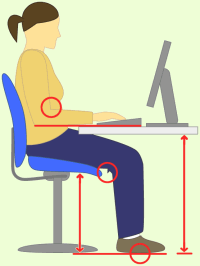
- Adjust the seat height so that your feet rest flat on the floor.
- Make sure that there is no pressure on the back of the knees.
Desk
- Adjust the desk height so that your wrists can rest comfortably on it.
- Your forearms should be level with the desk top and your upper and forearms should form a 90 degree angle or slightly more.
Tip! If you do not have an adjustable chair or desk, try using a lumbar support cushion, a cushion on the seat or a footrest.
Display and Keyboard
Now check that your display, keyboard and mouse are placed correctly.
Display
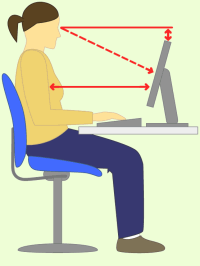
- Place the monitor directly in front of you at about an arm’s length away.
- Adjust the top of the computer screen to a little below eye level. You should be looking slightly downwards when you type.
Keyboard and Mouse
- Place the keyboard right in front of you, centered to the monitor.
- Place the mouse next to the the keyboard on the same plane. When using the mouse, keep your wrist straight and your upper arm close to the body.
Good Posture
Good posture is the key to comfort and health in your computer work. Check your posture using the list below.
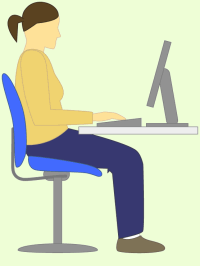
- Sit up straight, thighs fully supported by the seat.
- Center your body in front of the keyboard and monitor.
- Place your feet firmly on the floor or on a footrest.
- Relax your shoulders and keep your elbows close to the body.
- Keep forearms and wrists in a straight line (neutral position). Make sure that your wrists are not bent up or down, turned inwards or outwards.
- Take short breaks every now and then. Get up from the chair, stretch and move around.
- Vary the way you sit. Lean backwards and forwards, stretch your feet far forwards or lift them up.
- Listen to your body! If you feel any tension or pain, try to relieve it immediately with breaks, stretching and attention to your posture.
- Don't stress your muscles too much when learning to type. We recommend doing only a maximum of two lessons a day. That is a total of 10 exercises.
We recommend that you follow all these tips and instructions to make your work space comfortable and make healthy working practices a habit.